Neostox Options Trades Assistant
AI Options Assistant: Faster Options Order Setup.
Normally, an options trade means finding the contract, checking the strike, setting quantity, choosing the order type, entering target and stop-loss, and then finally placing the order.
With Options Trades Assistant, you set those preferences beforehand. When the decision comes, simply choose Buy Call, Buy Put, Sell Call or Sell Put — Neostox uses your saved preferences to find the option and place the virtual order accordingly.
You make the trading decision. Neostox handles the setup you already defined.
Explore Options Trades AssistantWithout Options Trades Assistant
- Search
- Find Strike
- Check Option
- Set Qty
- Set Order
- Target
- Stop-Loss
- Place
With Options Trades Assistant
- Saved Preferences
- BUY CALL
- Order Placed as Configured

Set Your Preferences Once. Change Them Whenever You Want.
Choose the rules Neostox should use when you place an options trade. Your selections are saved as your trading preferences — one reusable setup.
Market
Underlying & Expiry Select an index or stock with derivatives and choose the expiry.Capital
Investment & Quantity % of available balance or fixed amount. Fixed quantity or auto calculate.Order
Market / Limit Choose how the virtual order should be placed.Risk & Holding
Target, Stop-Loss, Intraday / Overnight Define target %, stop-loss % and holding style once.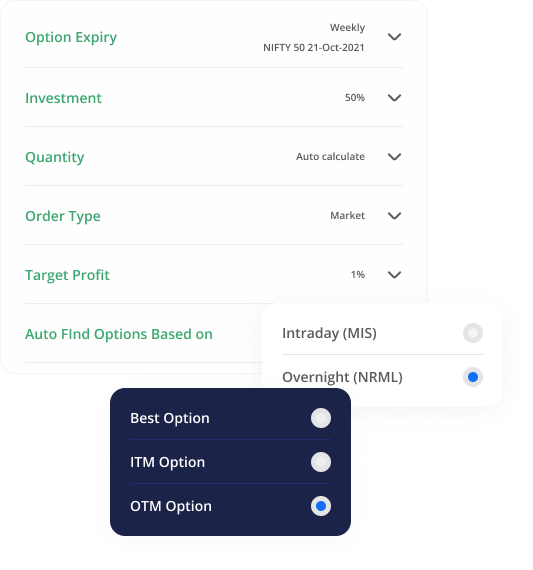
You Don’t Have to Search the Chain Every Time.
Choose the criteria Neostox should consider while identifying the option — then choose what type of option you want it to identify.
Auto Find By
Option Type
Identified Contract
Example contract for illustration. “Best Match” means strongest alignment with the underlying by Neostox comparison logic — not a trade recommendation.
Four Buttons. Your Saved Rules Behind Them.
Once your preferences are set, choose the trading action you want. Neostox applies your saved setup to place the virtual order.
Place a long Call order using your saved preferences.
- Option Found
- Qty Calculated
- Target / SL Applied
- Order Placed
After the click, Neostox uses your saved settings to:
- Identify the option
- Calculate the quantity
- Apply Market / Limit order
- Set the target
- Set the stop-loss
- Apply Intraday / Overnight
- Place the virtual order
The Decision Still Comes From You. The Repetition Doesn’t Have To.
Options Trades Assistant does not decide whether you should be bullish or bearish. It does not tell you to Buy a Call or Sell a Put. You make that decision. Neostox remembers how you want the order built so you do not repeat the same setup every time.
Normal Process
Decide → Search → Compare → Configure → Place
With Options Trades Assistant
Configure Once
Decide → Click
User Decides
Buy Call / Buy Put / Sell Call / Sell PutNeostox Executes
Your Saved SetupLess time rebuilding the order. More consistency in how you place it.
Quick FAQ
Options Trades Assistant Questions
Set Once. Use Again.
Make the Trading Decision Without Rebuilding the Order Every Time.
Set your preferences. Choose how Neostox should find the option. Then when the moment comes: Buy Call. Buy Put. Sell Call. Sell Put.
Try Options Trades Assistant